Send a link and anyone can see where you are on a live map, on any device, with no app and no account. Here is how WheresNow share links work, step by step.
W
WheresNow Team
Product
November 6, 2026
You need someone to know where you are right now, and you need it done in seconds. With WheresNow, you can share your live location with a link, and the person you send it to never has to install anything. Try WheresNow and send your first link today.
How do you share your live location with a link? Open WheresNow, tap the Share Location button on the map, choose how long to share, and tap Start Sharing. Then send the link by text, email, or any chat app. The other person taps it and sees your position on a map in their browser, with no app or account needed.
A live location link is a web address that opens a map showing where you are. The marker follows you as you move, so it is not a one-time pin that goes stale in five minutes.
You send the link the way you would send any other. Text it, email it, or drop it into a chat. Anyone who opens it can see your location until the link ends.
That is the big difference from most location tools. Many of them ask the other person to join an app first. A live location sharing link skips that step.
How to share your live location with a link (step by step)
Here is how to send a live location link from WheresNow:
Open the WheresNow app and tap the Share Location button on the map screen.
Choose how long to share: 15 minutes, 1 hour, 2 hours, 4 hours, or 8 hours.
Optional: turn on Live for faster updates, or pick a saved Place under Stop when I arrive at so the link ends on its own when you get there.
Tap Start Sharing.
Tap Share Link and send it with any app on your phone. The message reads "Here's my live location," followed by your link.
Once the link is active, the app shows how much time is left. You can add an hour with +1 hour, or tap Stop Sharing to end it right away.
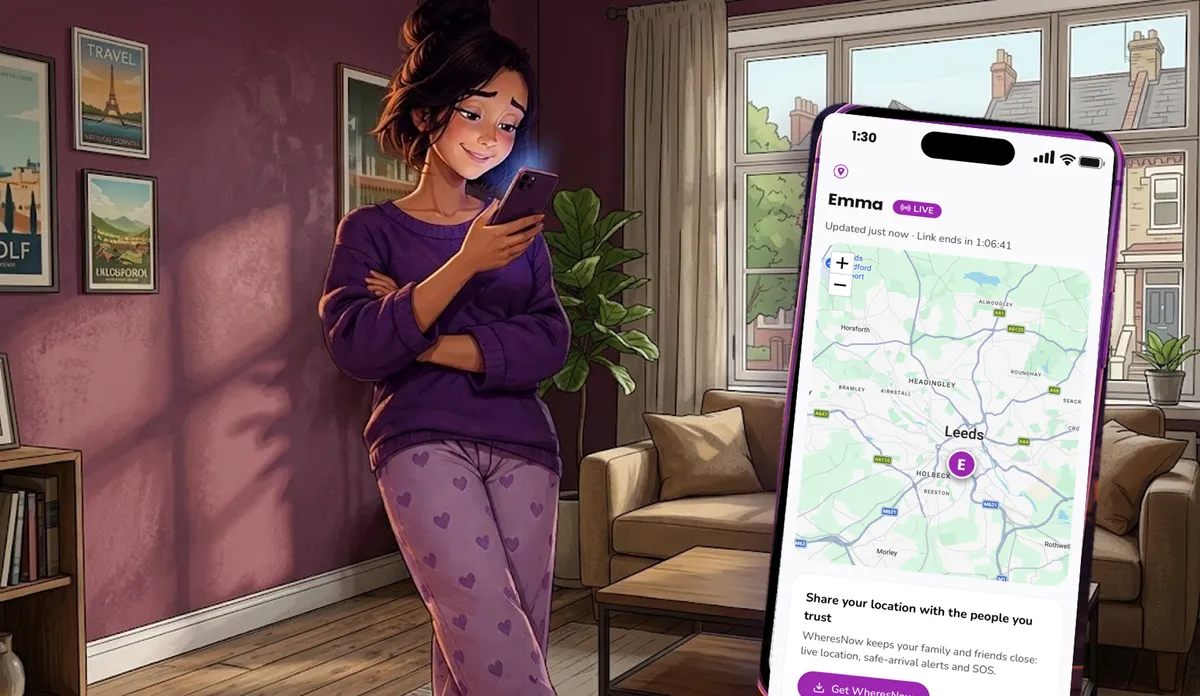
What the other person sees: your first name, a map with your marker, a note such as "Updated 2 min ago," and the time left on the link. If your link is in Live mode, they also see a Live badge.
WheresNow runs on iOS and Android, so you can send a link from either kind of phone.
How the recipient views your location without the app
Your friend or family member does not need to do anything special. Here is what happens on their side:
They get your message and tap the link.
A map opens in their web browser.
The page refreshes on its own, so they see your marker move while the link is active.
It works on any device with a web browser, such as a phone, tablet, or laptop. There is no sign-up form and no download. That matters when someone is waiting at a pickup spot and wants an answer fast.
The page also invites them to get WheresNow, and shows a referral code you can use if you want. That part is optional. The link works either way.
You can share real-time location with family or friends in many everyday moments. Here are five:
The school run. Tell a grandparent you are ten minutes out, without a stream of texts.
Meeting a friend in a busy place. Skip "where are you?" and let them watch you walk toward them.
Traveling alone. Send a link to someone you trust before a late train or an unfamiliar taxi ride, and set it to stop when you reach home.
Your commute. A partner can see you are stuck in traffic without you typing while you drive.
A visiting relative. Someone who is not in your Circles, and who may not be comfortable with new apps, can follow your trip from a link.
Is it safe? Privacy and control
Sharing your location should always be your choice. A link is only as private as the people you send it to, so send it to people you trust. Anyone who has the link can see your location until it ends, so treat it like a key.
Here is what you control:
You pick the time. Every link has an end time, and the app counts it down for you.
You can stop it at any moment. Tap Stop Sharing and the link stops working immediately.
You can end it on arrival. Choose a saved Place, and the link stops when you get there.
You know when it is opened. WheresNow sends you a notification the first time someone opens your link, and the app shows whether it has been opened.
One link at a time. Starting a new link replaces the previous one.
A few more details are worth knowing. Ghost Mode does not end a link you have already sent. That link keeps working until it expires or you stop it. If you want to stop all location collection, turn off the app's location permission.
The public link page does not use analytics or chat widgets, and it is set to stay out of search results. The link is built so its secret part is not sent to our web host when the page loads.
WheresNow is built around consent. You decide to share, you choose who gets the link, and you get notified when it is opened. It is not a way to track someone's location without their knowledge.
Sending a pin from a maps app is quick. For a fixed spot, like a restaurant, it is often all you need. It has limits when you are on the move.
One-time pin
WheresNow live link
Shows where you were when you sent it
Yes
Yes
Keeps updating as you move
No
Yes
You can end it early
No, it is a snapshot
Yes, tap Stop Sharing
Recipient needs WheresNow
Depends on the app you use
No
A pin is a snapshot. A live link is a short window that you open and close. Use a pin for a static address, and use a link when you are still traveling.
On the free plan, links last up to 1 hour. Pro unlocks longer links, up to 8 hours, and Live mode for faster updates. Your plan limit applies to the whole life of a link, including any time you add with +1 hour.
FAQ
Can I share my live location without the other person having the app?
Yes. They tap the link and a map opens in their browser. No app or account is required.
How do I send a live location link?
Open WheresNow, tap Share Location on the map, choose a duration, and tap Start Sharing. Then tap Share Link and send it by text, email, or any messaging app.
Can I track someone's location without an app?
You can only see a location that a person has chosen to share with you. With WheresNow, the person sharing creates the link, so it is always their decision, and they are notified when it is opened.
How long does a live location link last?
You choose 15 minutes, 1 hour, 2 hours, 4 hours, or 8 hours. Free plan links last up to 1 hour, and Pro links can last up to 8 hours. You can also stop a link yourself at any time.
Is it safe to share real-time location with family?
It is safe when you share only with people you trust and use the controls you have. Set a short duration, stop the link when you no longer need it, and remember that anyone with the link can see your location while it is active.
Does the link work on iPhone and Android?
The recipient can open it on any device with a web browser. To create a link, you need the WheresNow app, which runs on iOS and Android.
Ready to share your location the easy way?
Next time someone asks "where are you?", send a link instead of typing out directions. They get a live map, and you stay in control. Download WheresNow and try it.